What do my safety scores show?
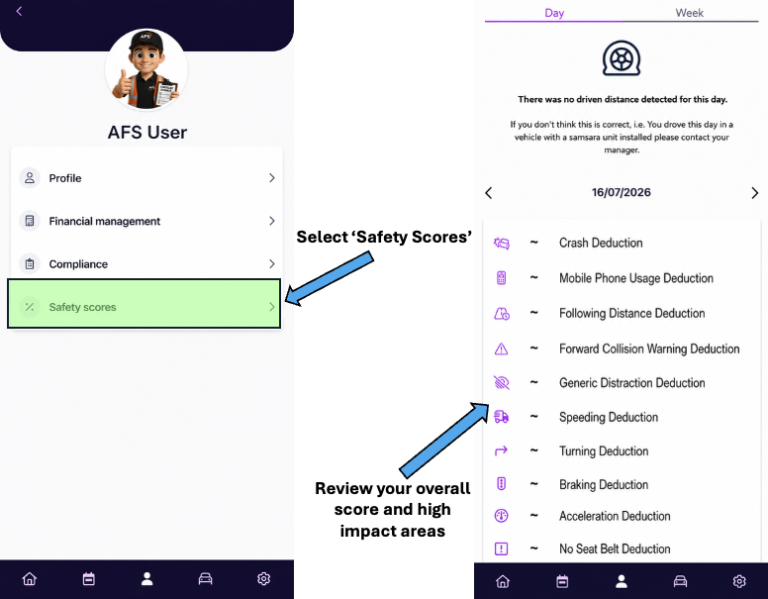
Your Safety Score reflects your driving performance and is measured using telematics and AI safety technology. Maintaining a high score helps keep you, your colleagues and the public safe whilst reducing preventable incidents.
Before finishing each shift, make sure you:
- ✅ Check your current Safety Score.
- ✅ Review any safety events that have been recorded.
- ✅ Understand why the event occurred.
- ✅ Learn how to prevent it happening again.
If your score is below 100%
If your Safety Score is anything less than 100%, please visit the relevant safety guide for the event(s) you’ve received.
Each guide explains:
- 📖 What the safety event means.
- 🎯 Why it was triggered.
- ✅ How to prevent it in the future.
- 🚐 Best practice when driving an Amazon vehicle.
Continuous Improvement
Safety events are there to help improve driving standards, not just monitor performance. Taking the time to understand your events and applying the coaching provided will help improve your Safety Score, reduce risk on the road and make you a safer driver.
Remember
🛡️ Review your Safety Score regularly.
📚 Use the safety guides for any event where you have lost points.
⭐ 100% should always be your target.