

🕒 3 min read
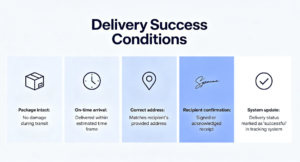
Delivery Success Conditions (DSC) is a key performance metric that measures how accurately and correctly deliveries are completed based on Delivery Workflow Compliance and Preference Honour Rate.
DSC replaces the previous DNR DPMO metric and is designed to ensure deliveries are completed using the correct process, correct scan types, accurate locations, and valid proof of delivery.
Achieving Compliance
To maintain a strong DSC score, delivery associates must ensure every delivery is completed correctly using the approved workflow. This includes:
- Correct delivery scan selection (Attended vs Safe Place).
- Accurate delivery location confirmation (Swipe to Finish).
- Valid Proof of Delivery (POD) photos.
- Honouring customer safe place preferences where applicable.
Key DSC Requirements
Attended Deliveries
If selecting Delivered to Household Member, the parcel must be physically handed to a person at the address.
- Only select this option when a customer or household member accepts the parcel directly.
- If the parcel is left in a safe location (e.g., behind bin, porch, shed), do not select Household Member.
Group Stops
Group stops must be delivered correctly to prevent workflow failures.
- Deliver group stops one by one.
- Only link stops together if they are all for the same exact location/address.
Swipe to Finish Location
Associates must complete the delivery as close to the correct geopin as possible.
- Swipe to finish near the actual delivery location.
- Any swipe completion over 25 metres from the geopin may be flagged.
- If the geopin is incorrect, it must be reported for adjustment.
Proof of Delivery (POD)
Proof of Delivery must be valid, clear, and accurately show where the parcel has been placed.
- Photos must be well-lit, clear, and not blurry.
- The parcel must be visible in the photo.
- Dark, unclear, or missing photos will be classed as an invalid POD and may flag under DSC.
Customer Safe Place Preferences
If a customer has selected a safe place preference, it must be followed correctly.
- Use the customer-selected safe place option (e.g., Back Door, Shed, Porch).
- Leave the parcel in that exact location and take a clear POD photo.
- Never select a safe place option that displays a yellow warning triangle.
If a safe place is not available or is unsafe, the delivery associate must attempt to contact the customer so the customer can suggest an alternative safe location.
Key Reminders:
- False scans are one of the biggest contributors to DSC failures (e.g., marking Household Member when the parcel was left unattended).
- Customers can confirm delivery accuracy through feedback, and false scans are tracked in reporting.
- Always ensure scan type, POD photo, and delivery location match the actual delivery action taken.
- Correct compliance reduces concessions and improves both individual and team scorecards.
By following these delivery standards, associates will maintain strong DSC performance, reduce concessions, and improve overall delivery quality and customer trust.


2 Comments
Easy to understand
Easy to understand